


Playwright has rapidly become one of the most preferred frameworks for modern test automation. Its speed, cross-browser support, reliable execution, and developer-friendly APIs have made it the framework of choice for organizations building scalable automation strategies.
But adopting Playwright is only the first step.
Many teams start with a handful of well-written tests, only to discover that maintaining hundreds or even thousands of automated tests across multiple applications, environments, and release cycles is a very different challenge. What works for a small automation project often breaks down as the framework, engineering team, and product grow.
This is why simply knowing Playwright’s features isn’t enough.
Building a reliable automation framework requires thoughtful decisions around project structure, locator strategies, test isolation, reporting, CI/CD integration, and long-term maintainability. These practices determine whether an automation suite continues to deliver value or gradually becomes another source of technical debt.
In this guide, we’ll explore Playwright best practices that go beyond writing your first test. From getting started and setting up a maintainable framework to implementing enterprise-scale automation strategies, you’ll learn how to build Playwright automation that remains reliable, scalable, and easy to maintain as your applications and engineering teams evolve.
Key Takeaways
- Playwright combines modern browser automation capabilities with built-in support for cross-browser testing, parallel execution, auto-waiting, and rich debugging, making it one of the most reliable frameworks for modern test automation.
- A successful Playwright implementation starts with a well-structured framework. Investing in project organization, reusable components, and centralized configuration early helps reduce maintenance effort as automation scales.
- Scalable Playwright automation depends on engineering best practices such as stable locator strategies, independent test execution, reusable fixtures, effective test data management, and consistent coding standards.
- Common automation challenges including flaky tests, duplicated code, fragile locators, and inconsistent framework architecture can be minimized by following proven Playwright implementation practices from the beginning.
- Integrating Playwright into CI/CD pipelines enables continuous testing, faster developer feedback, automated quality gates, and greater confidence in every software release.
- The success of a Playwright automation strategy should be measured using meaningful engineering metrics such as automation coverage, execution time, framework stability, maintenance effort, defect detection effectiveness, and pipeline performance.
- Organizations that treat Playwright as a long-term quality engineering platform rather than just a testing tool are better positioned to build scalable automation frameworks that evolve with their applications, engineering teams, and release cycles.
Why Playwright Has Become the Preferred Framework for Modern Test Automation?
The expectations placed on modern test automation have changed significantly over the past decade.
Applications are becoming increasingly dynamic, release cycles are getting shorter, and engineering teams are expected to deliver high-quality software at a much faster pace. As a result, automation frameworks are no longer evaluated solely on their ability to execute tests. They are expected to provide reliability, scalability, maintainability, and seamless integration into modern development workflows.
This shift has contributed to Playwright’s rapid adoption across startups, enterprises, and digital-first organizations. Developed by Microsoft, Playwright was designed to address many of the limitations experienced with traditional browser automation tools while supporting the needs of modern web applications.
Several capabilities make Playwright a preferred choice for today’s automation teams.
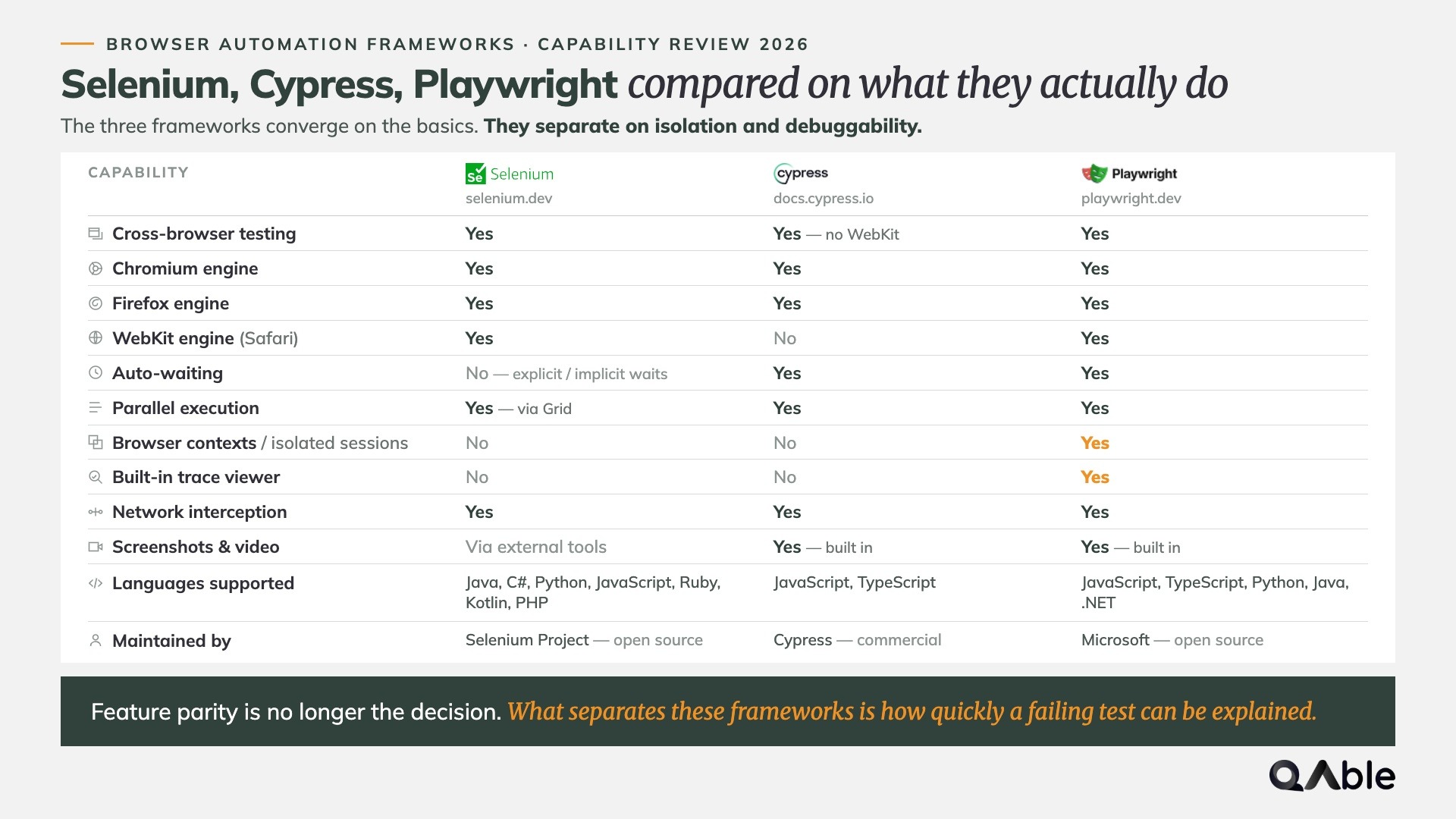
1. Cross-Browser Testing with a Single API
Playwright enables teams to automate tests across Chromium, Firefox, and WebKit using a unified API, reducing the need to maintain separate browser-specific automation logic.
This allows organizations to:
- Validate application behavior across multiple browsers
- Reduce framework complexity
- Improve browser compatibility
- Maintain consistent test implementation
2. Built for Modern Web Applications
Modern applications rely heavily on JavaScript frameworks, asynchronous operations, and dynamic UI rendering.
Playwright is designed to work effectively with these modern architectures by providing features such as automatic waiting, resilient element handling, and built-in synchronization, reducing many of the timing issues that commonly affect browser automation.
This results in:
- More reliable test execution
- Fewer synchronization failures
- Reduced flaky tests
- Better automation stability
3. Faster Test Execution
Execution speed plays a critical role in continuous testing.
Playwright supports parallel test execution, isolated browser contexts, and efficient resource management, allowing teams to execute large automation suites significantly faster without compromising test isolation.
Organizations benefit from:
- Faster regression testing
- Shorter CI/CD pipelines
- Quicker release validation
- Improved developer feedback loops
4. Rich Developer and Tester Experience
Beyond execution capabilities, Playwright provides an ecosystem that simplifies automation development and debugging.
Features such as Trace Viewer, Inspector, code generation, screenshots, videos, and detailed HTML reports help teams investigate failures more efficiently and improve overall productivity.
These capabilities support:
- Faster debugging
- Better collaboration between QA and developers
- Improved test maintenance
- Greater visibility into automation results
5. Designed for Scalable Automation
Perhaps the biggest reason organizations are adopting Playwright is its ability to support automation at scale.
As test suites grow, maintainability becomes just as important as functionality. Playwright provides a strong foundation for building structured automation frameworks through features like fixtures, reusable configurations, projects, parallel execution, and seamless CI/CD integration.
This enables teams to:
- Build maintainable automation frameworks
- Scale test suites confidently
- Standardize automation practices
- Support long-term quality engineering initiatives
Playwright has become more than just another browser automation tool. It has evolved into a comprehensive testing framework that aligns with the needs of modern software engineering.
However, choosing Playwright is only the beginning. The long-term success of an automation initiative depends on how the framework is implemented, structured, and maintained. That’s why the next step is understanding how to get started with Playwright the right way before building a framework that can scale with your applications and engineering teams.
Related Read: Selenium vs Playwright vs Cypress: Which Automation Testing Framework Should You Choose?
How to Get Started with Playwright?
Getting started with Playwright is relatively straightforward. In just a few commands, you can install the framework, generate a project structure, and execute your first automated test.
However, getting Playwright running and setting it up for long-term success are two different things.
Many automation initiatives begin with a basic project that works well for a handful of tests. As the application grows, teams often find themselves dealing with duplicated code, inconsistent project structures, unreliable test data, and frameworks that become increasingly difficult to maintain.
Starting with the right foundation helps avoid these challenges later.
Here’s how to get started with Playwright using the approach recommended by Microsoft while laying the groundwork for scalable automation.
1. Install Playwright
The first step is creating a new Playwright project.
Playwright supports JavaScript, TypeScript, Python, Java, and .NET, making it suitable for a wide range of development environments. For most modern web automation projects, Microsoft recommends using TypeScript because it provides stronger type safety, better IDE support, and improved maintainability.
During installation, Playwright automatically configures:
- Required browser binaries
- Example test files
- Configuration files
- Project structure
- Built-in reporting
This allows teams to begin writing and executing tests with minimal setup effort.
2. Understand the Default Project Structure
One of Playwright’s strengths is its clean and opinionated project structure.
A typical project includes:
- Test files
- Playwright configuration
- Browser projects
- Test reports
- Supporting utilities
Before writing additional tests, it’s important to understand the purpose of each directory and configuration file. Maintaining a consistent project structure from the beginning makes the framework easier to scale as more engineers contribute to it.
3. Configure Browsers and Test Environments
Playwright allows teams to execute the same test suite across multiple browsers and environments using a single configuration.
Common configuration tasks include:
- Selecting browser projects
- Managing base URLs
- Configuring test retries
- Setting execution timeouts
- Defining environment variables
- Enabling parallel execution
Keeping these settings centralized improves consistency and reduces duplication across test suites.
4. Write and Execute Your First Test
Once the project is configured, teams can begin creating automated tests using Playwright’s built-in testing framework.
Rather than focusing on complex business scenarios immediately, start with simple user journeys that validate core application functionality.
Examples include:
- User login
- Navigation flows
- Form submissions
- Search functionality
- Basic CRUD operations
This allows teams to become familiar with Playwright’s APIs while establishing reusable automation patterns.
5. Validate Reports and Debugging Tools
Running a test is only part of the workflow.
Understanding why a test passed or failed is equally important.
Playwright includes several built-in debugging capabilities that simplify failure investigation, including:
- HTML Reports
- Trace Viewer
- Screenshots
- Videos
- Inspector
- Code Generator
These tools help engineers analyze failures more efficiently and reduce the time spent troubleshooting automation issues.
Starting with Playwright is intentionally simple. The real challenge begins as your test suite grows and multiple engineers contribute to the same automation framework.
That’s where implementation decisions around architecture, coding standards, locator strategies, fixtures, and test organization become critical.
Related Read: Mastering Playwright: The Modern Developer’s Guide
How to Set Up a Playwright Testing Framework?
Setting up a Playwright testing framework takes only a few minutes, but the decisions you make during the initial setup can significantly impact the framework’s maintainability as your test suite grows.
While Playwright’s official project generator provides an excellent starting point, understanding what each component does and why it matters will help you build a framework that is easier to scale, maintain, and integrate into your development workflow.
Follow the steps below to create your first Playwright testing framework.
Step 1: Install Node.js
Playwright runs on Node.js, so the first step is to install a supported Long-Term Support (LTS) version of Node.js.
After installation, verify that both Node.js and npm are available by running:
Bash
node -v
npm -v
If both commands return version numbers, your environment is ready for Playwright.
Pro Tip: Use the latest LTS (Long-Term Support) version of Node.js instead of the Current release. LTS versions receive longer support, better ecosystem compatibility, and are generally more stable for production automation projects.
Step 2: Create a New Project Directory
Create a dedicated directory for your automation project and navigate into it.
Bash
mkdir playwright-framework
cd playwright-framework
Keeping automation in its own project makes dependency management, version control, and CI/CD integration significantly easier. It also helps isolate testing dependencies from your application codebase.
Step 3: Initialize the Playwright Project
Microsoft recommends using the Playwright project generator to create a fully configured project.
Run the following command:
Bash
npm init playwright@latest
During the setup process, Playwright will ask you to configure several options, including:
- Programming language (TypeScript or JavaScript)
- Project location
- Sample test creation
- Browser installation
- GitHub Actions workflow
For most automation projects, TypeScript is the recommended choice because it provides stronger type safety, better IDE support, and improved maintainability as your framework grows.
Pro Tip: Install the browser binaries during setup. This ensures your framework is ready to execute tests immediately and avoids additional configuration later.
Step 4: Understand the Generated Project Structure
Once installation is complete, Playwright generates a clean project structure similar to the following:
Plain text
playwright-framework/
tests/
playwright.config.ts
package.json
package-lock.json
node_modules/
Each component serves a specific purpose:
Component | Purpose |
tests/ | Stores your Playwright test files |
playwright.config.ts | Central configuration for browsers, execution, reporting, retries, and environments |
package.json | Manages project dependencies and npm scripts |
node_modules/ | Contains the installed project dependencies |
Understanding this structure early makes it easier to organize larger automation projects as your test suite expands.
Step 5: Configure Your Playwright Project
The playwright.config.ts file acts as the central configuration for your automation framework.
Some of the most commonly configured settings include:
- Base URL for the application under test
- Browser projects (Chromium, Firefox, and WebKit)
- Execution timeouts
- Retry policies
- Parallel execution
- HTML reporting
- Screenshot and video capture
- Trace collection for failed tests
Rather than hardcoding these settings throughout your test suite, keep them centralized inside the configuration file. This makes environment management simpler and reduces maintenance effort as the framework evolves.
Pro Tip: Store environment-specific values such as URLs, credentials, and API endpoints in environment variables instead of hardcoding them. This makes the framework easier to maintain across development, staging, and production environments.
Step 6: Create Your First Test
With the framework in place, you can begin creating your first Playwright test inside the tests directory.
A good starting point is a simple end-to-end user journey, such as:
- User login
- Homepage validation
- Search functionality
- Contact form submission
- Basic CRUD operations
Starting with smaller, deterministic scenarios helps validate that your framework is working correctly before moving on to more complex business workflows.
Step 7: Run Your Playwright Tests
Playwright provides multiple ways to execute your test suite depending on your development or debugging needs.
Run all tests:
Bash
npx playwright test
Run tests in headed mode:
Bash
npx playwright test --headed
Run a specific test file:
Bash
npx playwright test login.spec.ts
These execution options make it easy to switch between local development, debugging, and automated CI/CD pipeline execution.
Step 8: Review Test Reports and Debug Failures
Executing tests is only part of the automation lifecycle. Understanding why a test passed or failed is equally important.
Playwright includes several built-in debugging capabilities that simplify failure investigation:
- HTML Reports
- Trace Viewer
- Playwright Inspector
- Screenshots
- Video recordings
- Code Generator
To open the HTML report after execution, run:
Bash
npx playwright show-report
These built-in tools help engineers diagnose failures faster and significantly reduce troubleshooting effort.
Pro Tip: Make reviewing trace files a standard part of failure analysis. They often provide enough context to identify the root cause without rerunning the test.
Step 9: Organize Your Framework for Future Growth
The default Playwright project structure is ideal for getting started, but enterprise automation projects benefit from additional organization as the framework grows.
Consider introducing dedicated directories for:
- Page Objects
- Fixtures
- Test Data
- Utilities
- Helper Functions
- Configuration Files
- Constants
- Custom Reporters
A well-organized framework improves maintainability, encourages code reuse, and makes collaboration easier as more engineers contribute to the automation project.
Pro Tip: Organize your framework around business features rather than individual test types wherever possible. This keeps related components together and makes the project easier to navigate as it scales.
Setting up Playwright is intentionally simple. Building an automation framework that remains reliable as your application, engineering team, and test suite grow requires a different set of practices.
In the next section, we’ll explore the Playwright best practices that help teams create scalable, maintainable, and enterprise-ready test automation.
Related Read: How to Develop a Test Automation Strategy?
Playwright Best Practices for Building Scalable Test Automation
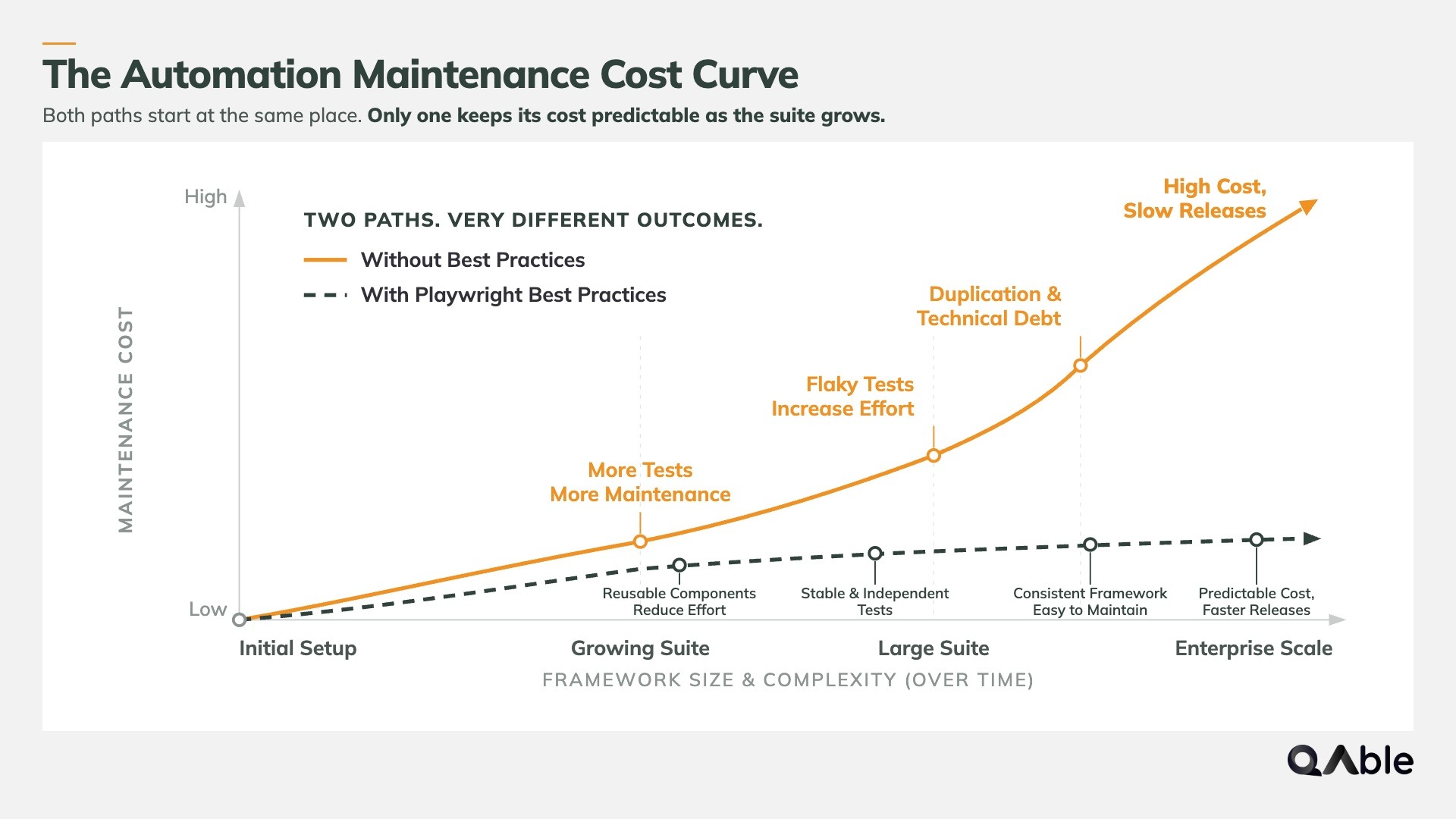
Building a Playwright framework is relatively easy. Building one that remains reliable after hundreds of test cases, multiple contributors, and continuous releases is where the real challenge begins.
Many automation projects start with clean code and a small test suite. Over time, duplicated logic, unstable locators, inconsistent test data, and poor project organization make the framework increasingly difficult to maintain. The result is slower execution, flaky tests, higher maintenance costs, and reduced confidence in automation.
Following proven engineering practices from the beginning helps teams avoid these challenges and build automation frameworks that continue to deliver value as applications evolve.
Below are some of the most important Playwright best practices for creating scalable, maintainable, and reliable test automation.
1. Build Stable Locator Strategies
One of the biggest causes of flaky automation is unstable element locators.
Playwright recommends prioritizing user-facing locators that reflect how users interact with an application rather than relying on implementation details like CSS classes or XPath expressions that frequently change during development.
A recommended locator priority is:
- getByRole()
- getByLabel()
- getByPlaceholder()
- getByText()
- getByTestId()
Using semantic locators makes tests easier to understand, improves accessibility alignment, and significantly reduces maintenance when the UI changes.
Pro Tip: Treat data-testid attributes as stable automation contracts between developers and testers. They provide predictable selectors that are less likely to break during UI updates.
2. Keep Tests Independent and Isolated
Every Playwright test should be capable of running independently.
Tests should never depend on another test creating data, logging in, or completing a workflow beforehand. Independent tests execute more reliably in parallel and are easier to debug when failures occur.
To improve isolation:
- Create fresh browser contexts for each test.
- Avoid shared application state.
- Reset test data whenever possible.
- Use fixtures instead of sharing variables between tests.
Independent tests improve reliability and allow automation suites to scale without introducing hidden dependencies.
Pro Tip: If changing the execution order causes tests to fail, the issue is usually shared state, not Playwright.
3. Reduce Code Duplication with Reusable Components
As automation projects grow, repeated code quickly becomes difficult to maintain.
Instead of duplicating common actions across multiple test files, extract reusable components into:
- Page Objects
- Fixtures
- Helper methods
- Utility functions
- Shared test data
This makes the framework easier to maintain, simplifies updates, and reduces the risk of inconsistent implementations across the test suite.
4. Let Playwright Handle Waiting
One of Playwright’s biggest advantages is its built-in auto-waiting mechanism.
Avoid using fixed delays such as:
JavaScript
await page.waitForTimeout(5000);
Static waits slow down execution and make automation less reliable.
Instead, rely on Playwright’s built-in waiting behavior and explicit expectations that synchronize automatically with the application’s state.
This results in:
- Faster execution
- More reliable synchronization
- Reduced flaky tests
- Better overall stability
Pro Tip: Fixed waits should only be used as a last resort for troubleshooting, not as part of production automation.
5. Organize Test Data Effectively
Hardcoded values make automation difficult to maintain.
Instead, separate test logic from test data by storing reusable datasets in dedicated files or external sources.
Good practices include:
- Reusable test accounts
- Environment-specific configurations
- External JSON or CSV datasets
- Dynamic test data generation
- Secure credential management
Separating data from test logic improves maintainability and allows the same tests to run across multiple environments with minimal changes.
6. Design for Parallel Execution
Playwright is built to execute tests in parallel.
However, simply enabling parallel execution is not enough.
Your framework should also avoid:
- Shared user accounts
- Shared browser state
- Shared test data
- Resource conflicts
A framework designed for parallel execution significantly reduces regression time while maintaining execution reliability.
7. Keep Assertions Focused on User Behavior
Assertions should validate what users actually experience rather than implementation details.
For example, verify:
- Visible content
- Button states
- Successful navigation
- Form validation
- Business outcomes
Avoid asserting internal implementation that users never interact with.
This keeps tests resilient to UI refactoring while continuing to validate meaningful application behavior.
8. Integrate Reporting and Debugging from Day One
Automation becomes significantly more valuable when failures are easy to investigate.
Playwright includes several built-in capabilities that should be enabled early in the project:
- HTML Reports
- Trace Viewer
- Screenshots
- Video recordings
- Execution logs
Comprehensive reporting reduces investigation time and improves collaboration between QA engineers and developers.
Pro Tip: Capture traces only for failed tests to balance debugging capabilities with storage and execution overhead.
Building scalable Playwright automation is not about following a long checklist of isolated tips. It is about establishing engineering practices that keep the framework reliable, maintainable, and easy to evolve over time.
As automation grows, even well-written tests can become difficult to manage without the right framework design. In the next section, we’ll explore the common mistakes that limit Playwright automation success and how to avoid them before they become long-term maintenance challenges.
Related Read: What to Automate First: A Practical 1–5 Scoring Framework
Common Playwright Mistakes That Limit Automation Success
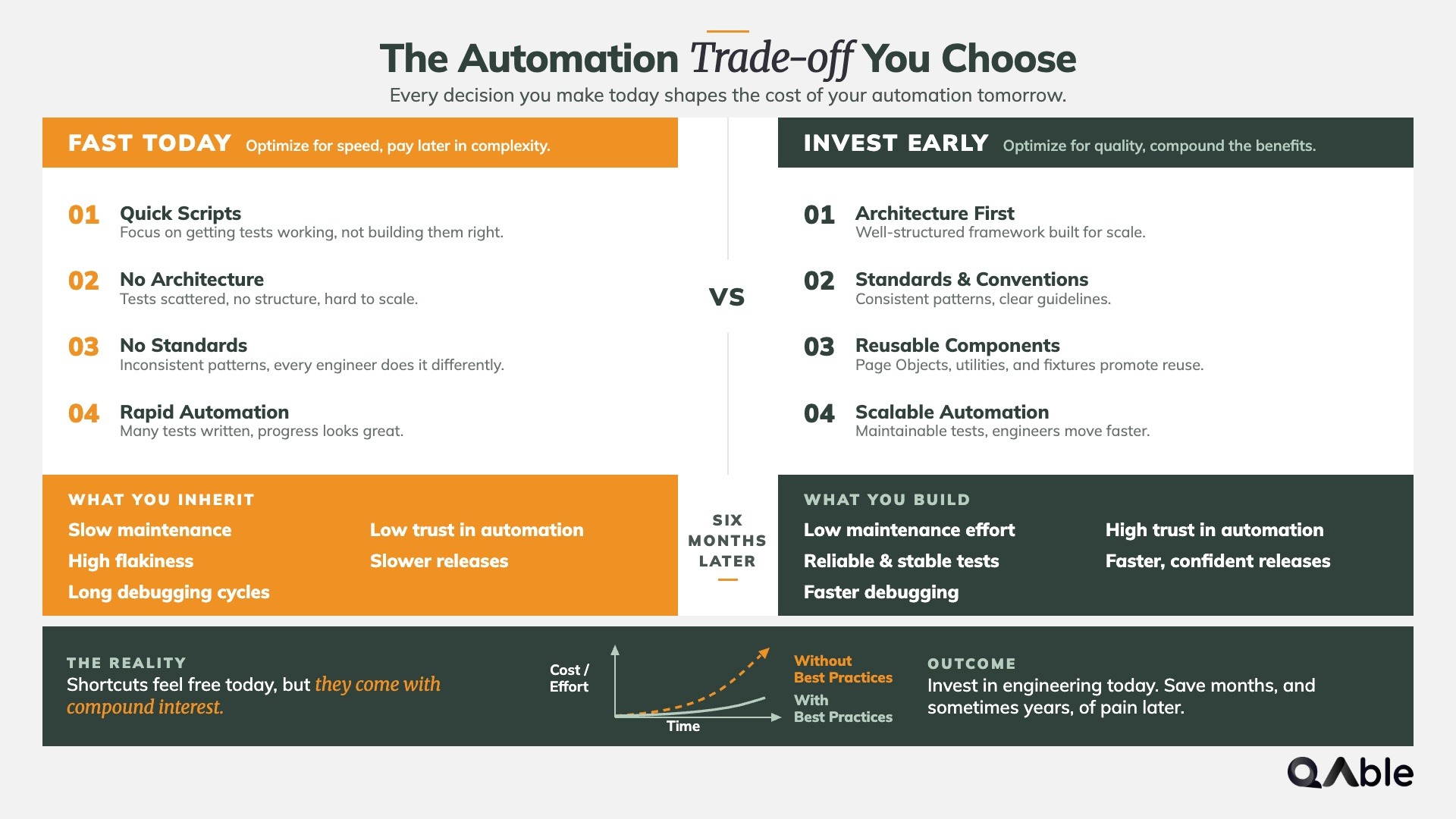
Adopting Playwright does not automatically guarantee reliable or maintainable test automation.
Many teams successfully build their first few automated tests, only to experience declining stability, increasing maintenance effort, and slower execution as the framework grows. In most cases, these issues are not caused by Playwright itself but by implementation decisions made during the early stages of the automation journey.
Recognizing these common mistakes early can help teams build a framework that remains scalable and reliable over the long term.
1. Treating Playwright as a Simple Testing Tool
One of the most common mistakes is approaching Playwright as just another browser automation library.
While writing individual tests is relatively straightforward, maintaining hundreds of automated tests requires thoughtful framework design, reusable components, standardized coding practices, and a clear automation strategy.
Without this foundation, automation often becomes difficult to scale and expensive to maintain.
Pro Tip: Think of Playwright as an automation platform rather than a collection of test scripts. Investing in architecture early pays significant dividends as the framework grows.
2. Relying on Fragile Locators
Many automation failures originate from unstable element locators.
Using deeply nested CSS selectors, XPath expressions, or dynamically generated attributes increases the likelihood of tests breaking after routine UI updates.
Instead, build locator strategies around stable, user-facing elements whenever possible.
This reduces maintenance effort while improving long-term automation reliability.
3. Ignoring Test Isolation
Automation frameworks often become unreliable when tests depend on shared state or previous executions.
Examples include:
- Reusing authenticated sessions across unrelated tests
- Sharing test data between scenarios
- Depending on execution order
- Modifying common datasets without cleanup
These dependencies make failures harder to reproduce and significantly reduce the effectiveness of parallel execution.
Independent tests are easier to debug, execute faster, and produce more reliable results.
4. Mixing Business Logic with Test Logic
As automation grows, test files often become overloaded with application-specific workflows, helper methods, and repeated implementation logic.
This creates large, difficult-to-maintain test suites where even small application changes require updates across multiple files.
Separating responsibilities through Page Objects, reusable fixtures, helper utilities, and centralized test data improves maintainability and reduces duplication.
5. Delaying Framework Standardization
Many teams postpone defining automation standards until the framework becomes large.
By then, inconsistent naming conventions, folder structures, coding styles, and reporting practices are already deeply embedded in the project.
Establishing standards early helps maintain consistency as new engineers contribute to the framework and reduces the effort required to review, maintain, and extend automation.
Pro Tip: Define automation coding standards, folder structures, naming conventions, and review guidelines before your framework exceeds a few dozen test files.
6. Treating Flaky Tests as Normal
Flaky tests gradually erode confidence in automation.
When teams repeatedly rerun failed tests instead of identifying the root cause, unreliable automation becomes accepted as part of the delivery process.
Over time, engineers begin ignoring failures, reducing the overall value of continuous testing.
Every flaky test should be treated as technical debt and investigated with the same discipline as a production defect.
7. Waiting Too Long to Integrate with CI/CD
Some teams focus exclusively on local test execution during the early stages of automation and postpone CI/CD integration until later.
This often results in environment inconsistencies, longer feedback cycles, and automation that behaves differently in local and shared environments.
Integrating Playwright into CI/CD from the beginning helps teams identify issues earlier, validate changes continuously, and establish automation as part of the software delivery lifecycle rather than an isolated QA activity.
Playwright provides a powerful foundation for modern test automation, but the framework alone cannot guarantee long-term success. Reliable automation is built through sound engineering practices, consistent architecture, and continuous refinement.
The next step is understanding how to design a Playwright framework that remains maintainable as test suites expand, engineering teams grow, and release cycles accelerate.
Related Read: How to Identify and Fix Flaky Tests in Engineering Teams?
Designing a Scalable Playwright Framework Architecture
The quality of an automation framework is rarely determined by how quickly the first few tests are written. It becomes evident months later, when hundreds of test cases, multiple contributors, and frequent application changes begin putting pressure on the framework.
A well-designed architecture helps teams organize automation logically, reduce maintenance effort, encourage code reuse, and make onboarding easier for new contributors. More importantly, it allows the framework to evolve alongside the product without becoming increasingly difficult to manage.
The following architectural practices help create a Playwright framework that remains scalable over the long term.
1. Organize the Framework by Responsibility
As automation grows, keeping related components separated makes the framework easier to understand and maintain.
A scalable Playwright framework typically includes dedicated areas for:
- Test specifications
- Page Objects
- Fixtures
- Test data
- Helper utilities
- Configuration files
- Constants
- Custom reporters
Separating responsibilities reduces code duplication and allows engineers to locate and update components more efficiently.
Pro Tip: Keep the project structure consistent across all feature teams. A standardized architecture reduces onboarding time and simplifies code reviews.
2. Use the Page Object Model Judiciously
The Page Object Model (POM) is one of the most common design patterns in UI automation because it separates page interactions from test logic.
Instead of embedding selectors and UI actions directly inside test files, Page Objects encapsulate them into reusable classes, making tests cleaner and easier to maintain.
However, avoid turning Page Objects into large “god classes” that contain every possible action for a page. Keep them focused on reusable interactions and business-relevant behaviors.
This approach improves readability, reduces duplication, and minimizes the impact of UI changes.
3. Centralize Configuration and Environment Management
Managing configuration across multiple environments becomes increasingly complex as applications scale.
Rather than hardcoding values throughout the framework, centralize configuration for:
- Base URLs
- Environment variables
- Browser settings
- Timeouts
- Retry policies
- User credentials
- Feature flags
Centralized configuration simplifies environment switching and reduces the likelihood of inconsistent test execution.
Pro Tip: Keep sensitive values such as credentials and API keys outside the framework by using secure environment variables or your CI/CD platform’s secret management capabilities.
4. Build Reusable Fixtures and Shared Components
Playwright fixtures provide a structured way to share setup and teardown logic across tests without introducing unnecessary duplication.
Reusable fixtures can manage:
- Authentication
- Browser contexts
- Test data setup
- API clients
- Common utilities
This keeps test files focused on business scenarios while improving consistency across the framework.
5. Separate Test Logic from Test Data
Hardcoded values become increasingly difficult to manage as automation expands.
Store reusable datasets, environment-specific values, and configuration separately from test logic whenever possible.
This approach enables:
- Easier maintenance
- Improved readability
- Better test reusability
- Multi-environment execution
- Simplified data updates
Separating data from logic also supports data-driven testing without introducing unnecessary complexity into individual test cases.
6. Design for Long-Term Maintainability
Scalable automation frameworks are designed with future growth in mind.
This includes establishing standards for:
- Folder organization
- Naming conventions
- Code reviews
- Documentation
- Component reuse
- Automation governance
Consistent engineering practices make it easier for multiple contributors to work within the same framework while reducing maintenance effort over time.
Pro Tip: Treat your automation framework like any other production software project. Regular refactoring, documentation updates, and architectural reviews help prevent technical debt from accumulating.
A scalable Playwright framework is not defined by the number of automated tests it contains. It is defined by how easily those tests can be maintained, extended, and executed as applications and engineering teams evolve.
Once the framework is built, the next step is integrating it into the software delivery pipeline. In the following section, we’ll explore how to integrate Playwright into CI/CD pipelines to enable faster feedback, continuous validation, and more reliable software releases.
Related Read: QAOps vs DevOps: Everything You Need to Know
Integrating Playwright into CI/CD Pipelines
Modern software development depends on rapid, reliable, and continuous feedback. Running Playwright tests only on local machines limits their value, as issues may go unnoticed until later stages of development or even after deployment.
Integrating Playwright into your CI/CD pipeline ensures that automated tests become part of every code change, allowing teams to identify defects earlier, validate application quality continuously, and release software with greater confidence.
Rather than treating automation as a separate QA activity, Playwright should become an integral part of the software delivery lifecycle.
1. Execute Tests Automatically on Every Code Change
The primary objective of CI/CD integration is to validate application quality whenever changes are introduced.
Playwright tests can be triggered automatically during:
- Pull requests
- Feature branch merges
- Nightly regression runs
- Release candidate validation
- Production deployment pipelines
Automating these execution points provides immediate feedback to developers and reduces the risk of introducing regressions into the application.
Pro Tip: Run a smaller suite of critical smoke tests on every pull request and reserve full regression suites for scheduled or release pipelines to maintain fast developer feedback.
2. Optimize Execution Through Parallel Testing
Large automation suites can significantly increase pipeline duration if executed sequentially.
Playwright’s built-in support for parallel execution enables teams to distribute tests across multiple workers, reducing overall execution time while maintaining test isolation.
To maximize efficiency:
- Configure parallel workers appropriately.
- Group independent tests for concurrent execution.
- Eliminate shared dependencies between tests.
- Monitor execution time regularly.
Shorter execution cycles accelerate feedback and improve overall release velocity.
3. Manage Test Environments Consistently
A reliable pipeline depends on predictable environments.
Differences between local machines, staging environments, and CI runners often lead to inconsistent automation results.
Maintain consistency by:
- Using environment variables
- Centralizing configuration
- Managing browser versions
- Keeping dependencies synchronized
- Standardizing test data
Reducing environmental differences minimizes false failures and improves trust in automation.
4. Capture Reports and Debugging Artifacts
A failed pipeline should provide enough information for engineers to investigate issues without rerunning the entire suite.
Configure your CI/CD workflow to preserve:
- HTML Reports
- Trace files
- Screenshots
- Video recordings
- Execution logs
These artifacts significantly reduce debugging time and improve collaboration between QA engineers and developers.
Pro Tip: Retain debugging artifacts only for failed executions to balance storage costs with troubleshooting needs.
5. Use Quality Gates Before Deployment
Automation delivers the greatest value when it actively influences release decisions.
Quality gates help ensure that only builds meeting predefined quality criteria progress through the deployment pipeline.
Common quality gates include:
- Critical test pass rate
- Smoke test completion
- Regression suite status
- Security validation
- Performance thresholds
Rather than treating automation reports as informational, use them as release approval criteria.
6. Monitor and Continuously Improve Pipeline Performance
CI/CD integration is not a one-time activity.
As applications and automation suites evolve, pipelines should be reviewed regularly to identify bottlenecks and opportunities for optimization.
Monitor metrics such as:
- Pipeline execution time
- Automation pass rate
- Flaky test frequency
- Average debugging time
- Regression duration
- Pipeline success rate
Tracking these metrics helps teams maintain a fast, reliable, and scalable automation process over the long term.
Pro Tip: Review pipeline health periodically, not just test failures. A growing execution time or increasing flakiness often signals framework issues that should be addressed before they impact delivery.
Integrating Playwright into a CI/CD pipeline transforms automation from a collection of isolated test scripts into a continuous quality assurance system.
By automating test execution, optimizing pipeline performance, capturing actionable insights, and enforcing quality gates, organizations can accelerate software delivery without compromising reliability.
The final step is understanding whether your automation strategy is actually delivering value. In the next section, we’ll explore the key metrics and KPIs that help measure the success of a Playwright automation initiative.
Related Read: Top 6 Software Quality Metrics Every QA Team Should Track
Measuring the Success of Your Playwright Automation Strategy
Implementing Playwright is only one part of a successful automation strategy. Equally important is understanding whether the framework is delivering measurable value to your engineering organization.
Many teams evaluate automation based solely on the number of automated test cases. While test coverage is important, it provides only a partial view of automation effectiveness.
A successful Playwright implementation should improve software quality, reduce maintenance effort, accelerate delivery, and increase confidence in every release. Measuring the right performance indicators helps teams identify improvement opportunities and demonstrate the return on their automation investment.
Below are some of the key metrics every QA leader should monitor.
1. Test Automation Coverage
Automation coverage indicates how much of your application’s critical functionality is protected by automated tests.
Rather than aiming for 100% automation, prioritize business-critical workflows, high-risk user journeys, and frequently executed regression scenarios.
Track metrics such as:
- Critical user journey coverage
- Regression suite coverage
- API automation coverage
- Cross-browser coverage
- End-to-end workflow coverage
High-quality coverage is significantly more valuable than simply having a large number of automated test cases.
Pro Tip: Measure automation coverage based on business risk, not the total number of test cases. Automating low-risk scenarios adds far less value than protecting high-impact workflows.
2. Test Execution Time
As automation suites expand, execution time becomes increasingly important.
Long-running regression suites delay developer feedback and slow release cycles.
Monitor:
- Total regression duration
- Average test execution time
- Parallel execution efficiency
- Pipeline execution time
- Smoke suite duration
Reducing execution time enables teams to validate changes faster while supporting continuous delivery objectives.
3. Test Stability and Flakiness
Reliable automation builds confidence. Flaky automation undermines it.
Repeated test failures caused by synchronization issues, unstable environments, or poor locator strategies reduce trust in the framework and often result in unnecessary reruns.
Key indicators include:
- Flaky test percentage
- Retry frequency
- False failure rate
- Failure consistency
- Test reliability trend
Maintaining a low flake rate should be treated as a core automation quality objective.
Pro Tip: A growing flake rate is often an early warning sign that your framework needs architectural improvements rather than additional test cases.
4. Maintenance Effort
Automation should reduce manual effort, not replace one maintenance burden with another.
Track the amount of engineering time spent on:
- Updating broken tests
- Fixing locators
- Maintaining test data
- Refactoring automation code
- Investigating framework issues
Lower maintenance effort allows QA engineers to spend more time improving test coverage and validating new functionality instead of repairing existing automation.
5. Defect Detection Effectiveness
One of the primary goals of automation is identifying defects before they reach production.
Monitor metrics such as:
- Defects detected during automated testing
- Production defect leakage
- Regression defects identified before release
- Critical defects prevented
- Defect escape rate
Improving these metrics demonstrates that the automation strategy is contributing directly to software quality.
6. CI/CD Pipeline Performance
Since Playwright is commonly integrated into continuous delivery pipelines, pipeline health should also be part of automation measurement.
Evaluate:
- Pipeline success rate
- Automation gate pass rate
- Build validation time
- Average recovery time after failures
- Release readiness
Healthy pipelines provide fast, reliable feedback that enables engineering teams to release software with greater confidence.
7. Return on Automation Investment
Ultimately, automation should deliver measurable business value.
Rather than evaluating Playwright solely as a technical implementation, assess how it contributes to engineering efficiency and product quality.
Consider indicators such as:
- Reduction in manual testing effort
- Faster release cycles
- Improved regression efficiency
- Lower maintenance costs
- Increased deployment confidence
- Better engineering productivity
These outcomes provide a more meaningful measure of success than simply tracking the number of automated scripts.
Pro Tip: Review automation metrics as part of regular engineering or sprint retrospectives. Continuous measurement helps identify trends early and ensures your automation strategy continues to evolve alongside your product.
A successful Playwright automation strategy is not defined by how many tests are automated, it is defined by how effectively those tests improve software quality, accelerate delivery, and reduce engineering effort.
By monitoring the right metrics, teams can continuously refine their automation framework, justify future investments, and ensure Playwright remains a strategic asset rather than simply another testing tool.
The next step is understanding how to turn these practices into long-term success. In the following section, we’ll explore how QAble helps organizations build scalable Playwright automation frameworks that support enterprise-quality engineering initiatives.
Related Read: Measuring Test Automation's Business Impact
How QAble Helps Teams Build Scalable Playwright Automation?
Building a Playwright framework is relatively straightforward. Building one that remains reliable, maintainable, and scalable across multiple products, engineering teams, and release cycles is a much bigger challenge.
As automation initiatives grow, organizations often face increasing maintenance costs, inconsistent framework structures, flaky test suites, and longer execution times. These issues rarely stem from Playwright itself. More often, they result from architectural decisions, implementation approaches, and automation strategies that were never designed to support long-term growth.
This is where QAble helps.
As a quality engineering partner, QAble helps organizations build, modernize, and scale Playwright automation frameworks that support continuous delivery while improving software quality, engineering productivity, and release confidence.
1. Playwright Automation Strategy and Consulting
Successful automation starts with a clear strategy.
QAble works closely with engineering teams to evaluate existing automation maturity, identify implementation challenges, and define a roadmap for adopting or scaling Playwright effectively.
This includes:
- Automation maturity assessments
- Framework strategy
- Technology selection
- Migration planning
- Automation governance
- Best practice recommendations
The objective is to ensure every automation initiative aligns with business goals and long-term engineering priorities.
2. Playwright Framework Development and Modernization
Whether you’re building a new automation framework or modernizing an existing one, QAble helps design frameworks that remain scalable as applications and teams grow.
Our expertise includes:
- Playwright framework development
- Framework restructuring
- Reusable component design
- Page Object Model implementation
- Test data architecture
- Framework optimization
The result is an automation framework that is easier to maintain, extend, and scale.
3. End-to-End Test Automation Services
Automation extends beyond selecting the right framework.
QAble provides comprehensive test automation services that help organizations accelerate quality across the entire software delivery lifecycle.
Our automation capabilities include:
- Playwright Automation Testing
- Selenium Automation Testing
- Mobile Automation Testing
- API Automation Testing
- Cross-browser testing
- Regression automation
- Continuous test automation
These services help engineering teams increase automation coverage while reducing manual testing effort.
4. CI/CD Integration and Continuous Quality Engineering
Modern automation delivers the greatest value when integrated into the software delivery pipeline.
QAble helps organizations incorporate Playwright into CI/CD workflows that provide continuous validation and rapid feedback throughout the development lifecycle.
Our services include:
- CI/CD pipeline integration
- Continuous testing implementation
- Automated quality gates
- Test execution optimization
- Reporting and analytics
- Release readiness validation
This enables teams to identify issues earlier and deliver software with greater confidence.
5. Accelerating Automation with TesboX
For organizations looking to accelerate automation implementation, QAble offers TesboX, our intelligent automation solution designed to simplify framework adoption and improve automation efficiency.
TesboX helps engineering teams:
- Accelerate Playwright adoption
- Reduce framework setup effort
- Improve automation maintainability
- Standardize automation practices
- Increase execution reliability
- Scale automation faster
By combining proven automation engineering practices with intelligent tooling, TesboX helps teams shorten implementation timelines while building a stronger automation foundation.
6. End-to-End Quality Engineering Services
Playwright is one part of a successful quality engineering strategy.
QAble supports organizations with comprehensive testing and quality engineering services that strengthen software quality across every stage of development.
Our services include:
- Functional Testing
- API Testing
- Performance Testing
- Security Testing
- Accessibility Testing
- Mobile Application Testing
- Web Application Testing
- AI/ML Application Testing
- Quality Engineering Consulting
Whether you’re starting your Playwright journey or scaling enterprise-wide automation, QAble helps build testing ecosystems that are reliable, maintainable, and aligned with modern software delivery practices.
Playwright provides an excellent foundation for modern test automation, but long-term success depends on much more than the framework itself.
With the right strategy, architecture, engineering practices, and implementation partner, organizations can transform Playwright from a testing tool into a scalable quality engineering platform that supports faster releases and higher software quality.
Explore Playwright Automation Testing Service | TesboX
Final Thoughts
Playwright has established itself as one of the most capable frameworks for modern test automation. Its speed, cross-browser support, developer-friendly APIs, and built-in testing capabilities make it an excellent choice for organizations looking to improve automation efficiency and software quality.
However, adopting Playwright is only the beginning of the journey.
The long-term success of any automation initiative depends on the decisions made after the initial setup. A well-structured framework, stable locator strategy, reusable architecture, reliable CI/CD integration, and continuous measurement of automation performance are what enable Playwright to deliver lasting value as applications and engineering teams evolve.
Organizations that treat automation as a strategic engineering investment not just a collection of automated scripts are better positioned to build scalable frameworks, reduce maintenance effort, accelerate release cycles, and improve confidence in every deployment.
Whether you’re just getting started with Playwright or looking to modernize an existing automation framework, the goal should always be the same: build automation that is reliable today and sustainable for the future.
At QAble, we help organizations design, implement, and scale Playwright automation frameworks that support long-term quality engineering goals. By combining proven automation practices with deep quality engineering expertise, we enable teams to transform Playwright into a scalable foundation for continuous testing and faster software delivery.